Creating Custom DSL Rules
Write custom posting rules using the Axiomatic DSL to handle your unique business transactions.
Overview
Axiomatic's posting engine uses a purpose-built DSL (Domain-Specific Language) to define how events become journal entries. While the built-in rule packs cover standard accounting scenarios, you can create custom rules for your specific business needs.
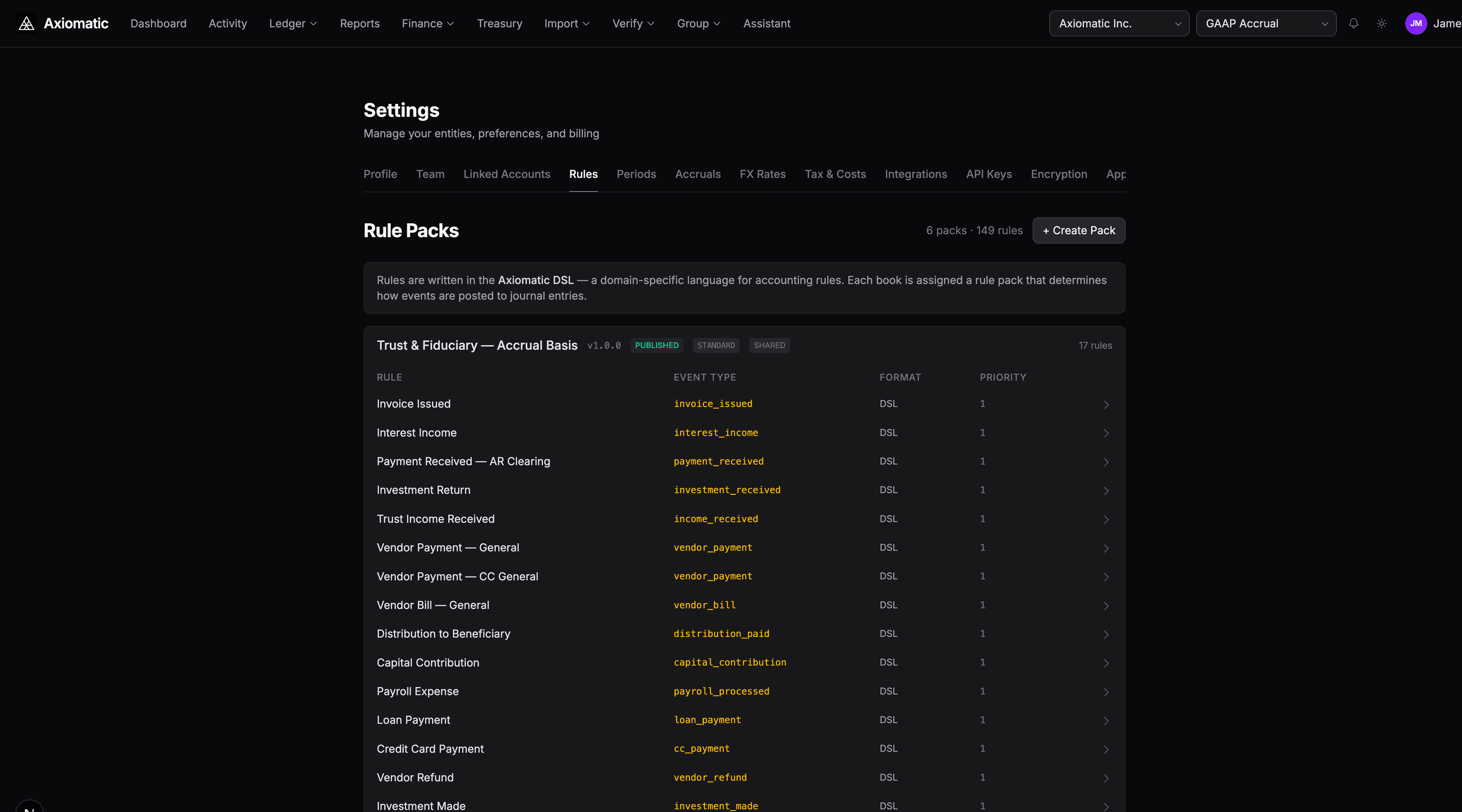
Navigate to Settings → Rules (or press G then S and select the Rules tab).
Rule Structure
Every rule follows this structure:
rule "Rule Name" {
  on "event_type"
  basis cash|accrual
  sources [DEPOSITORY, CREDIT_CARD, ...]
  priority 10
  where <condition>

  let variable = <expression>

  post {
    debit {
      account: account("role.subrole")
      amount: <expression>
      currency: <expression>
      memo: <expression>
    }
    credit {
      account: account("role.subrole")
      amount: <expression>
      currency: <expression>
    }
  }
}
Writing Your First Rule
Let's create a rule for a SaaS subscription payment:
rule "SaaS Subscription Payment" {
  on "vendor_payment"
  basis cash
  sources [DEPOSITORY]
  priority 15
  where contains(payload.category, "software")

  let amt = coalesce(payload.total_amount, payload.amount)
  let ccy = coalesce(payload.currency, "USD")

  post {
    debit {
      account: account("expense.software")
      amount: amt
      currency: ccy
      memo: coalesce(payload.vendor, "") ++ " — " ++ coalesce(payload.description, "")
    }
    credit {
      account: account("cash.operating")
      amount: amt
      currency: ccy
    }
  }
}
What Each Clause Does
| Clause | Purpose |
|---|---|
on "vendor_payment" | This rule fires for vendor_payment events |
basis cash | Declares this as a cash-basis rule (expense recognized on payment) |
sources [DEPOSITORY] | Only matches transactions from bank accounts (not credit cards) |
priority 15 | Higher priority rules are tried first (default is 0) |
where contains(...) | Condition: only fires if the category contains "software" |
let amt = ... | Variable binding: extracts the amount from the event payload |
post { ... } | The journal entry to create: debit expense, credit cash |
Key Concepts
Account Roles
The account("role.subrole") function maps a logical role to the actual account in your chart of accounts. Common roles:
| Role | Description |
|---|---|
cash.operating | Primary checking/operating account |
expense.software | Software & SaaS expenses |
expense.general | General operating expenses |
revenue.services | Service revenue |
liability.accounts_payable | Accounts payable |
asset.accounts_receivable | Accounts receivable |
Account mappings are configured in Settings → Account Mappings. You can define different mappings per entity or use the defaults from your rule pack.
Conditions with where
Conditions determine whether a rule matches. Available functions:
| Function | Example |
|---|---|
contains(str, substr) | contains(payload.category, "legal") |
starts_with(str, prefix) | starts_with(payload.vendor, "AWS") |
between(val, lo, hi) | between(payload.amount, 0, 1000) |
is_null(val) | is_null(payload.tax_amount) |
coalesce(a, b) | coalesce(payload.memo, "No memo") |
Combine with and, or, not:
where contains(payload.category, "software") and payload.amount > 100Priority and Rule Resolution
When multiple rules match the same event type, the highest-priority rule wins. Use this for specialization:
rule "AWS Cloud Expense" {
  on "vendor_payment"
  priority 20
  where starts_with(payload.vendor, "Amazon Web Services")
  ...
}

rule "General Vendor Payment" {
  on "vendor_payment"
  priority 5
  ...
}
AWS payments match the first rule (priority 20). All other vendor payments fall through to the general rule (priority 5).
Balance Requirements
Rules can self-declare balance prerequisites:
rule "Debt Payment" {
  on "debt_payment"
  requires balance("liability.accounts_payable") > 0
  ...
}
This rule only fires if there's an outstanding AP balance, preventing erroneous postings.
Testing a Rule
Before publishing, test your rule against a sample payload:
Via the AI Assistant
Test this rule against a sample event with amount 500 and category software
The AI validates the DSL syntax and evaluates the rule against your payload, showing the resulting journal lines.
Via the API
POST /api/dsl/evaluate
{
  "source": "rule \"Test\" { on \"vendor_payment\" ... }",
  "payload": {
    "amount": "500.00",
    "currency": "USD",
    "category": "software",
    "vendor": "Vercel"
  }
}
The response shows whether the rule matched and what journal lines it produced.
Publishing Rules
Rules live in rule packs. To add a custom rule:
- Go to Settings → Rules
- Select your entity's custom rule pack (or create one)
- Add the rule
- The rule pack is automatically versioned — each edit creates a new version
- Published rules take effect immediately for future events
Using the AI to Author Rules
You can also ask the AI to create rules for you:
Create a posting rule for consulting revenue invoices
The AI proposes a rule with proper account mappings and creates a PENDING proposal. Review it in the Proposals tab and approve to publish.
Pack Chaining
Your custom rules sit at the highest priority in the pack chain:
- Standard Pack (priority 10) — GAAP/Tax rules
- Industry Pack (priority 20) — Industry-specific rules
- Your Custom Pack (priority 30) — Your overrides
This means your custom rules always take precedence over inherited rules. See Industry Rule Packs for details on the pack chaining architecture.
Next Steps
- Industry Rule Packs — Browse available industry-specific rule packs
- Rules reference — Full DSL syntax and built-in functions
- Using the AI Assistant — Let the AI author rules for you