Using the AI Assistant
Learn how to use the AI assistant for querying your books, classifying transactions, creating rules, and running accounting engines.
Overview
The AI Assistant is a conversational interface to your entire accounting system. It can query your books, classify imported transactions, create journal entries, author posting rules, and run dedicated accounting engines — all through natural language.
Open the Assistant from the sidebar (or press G then C).
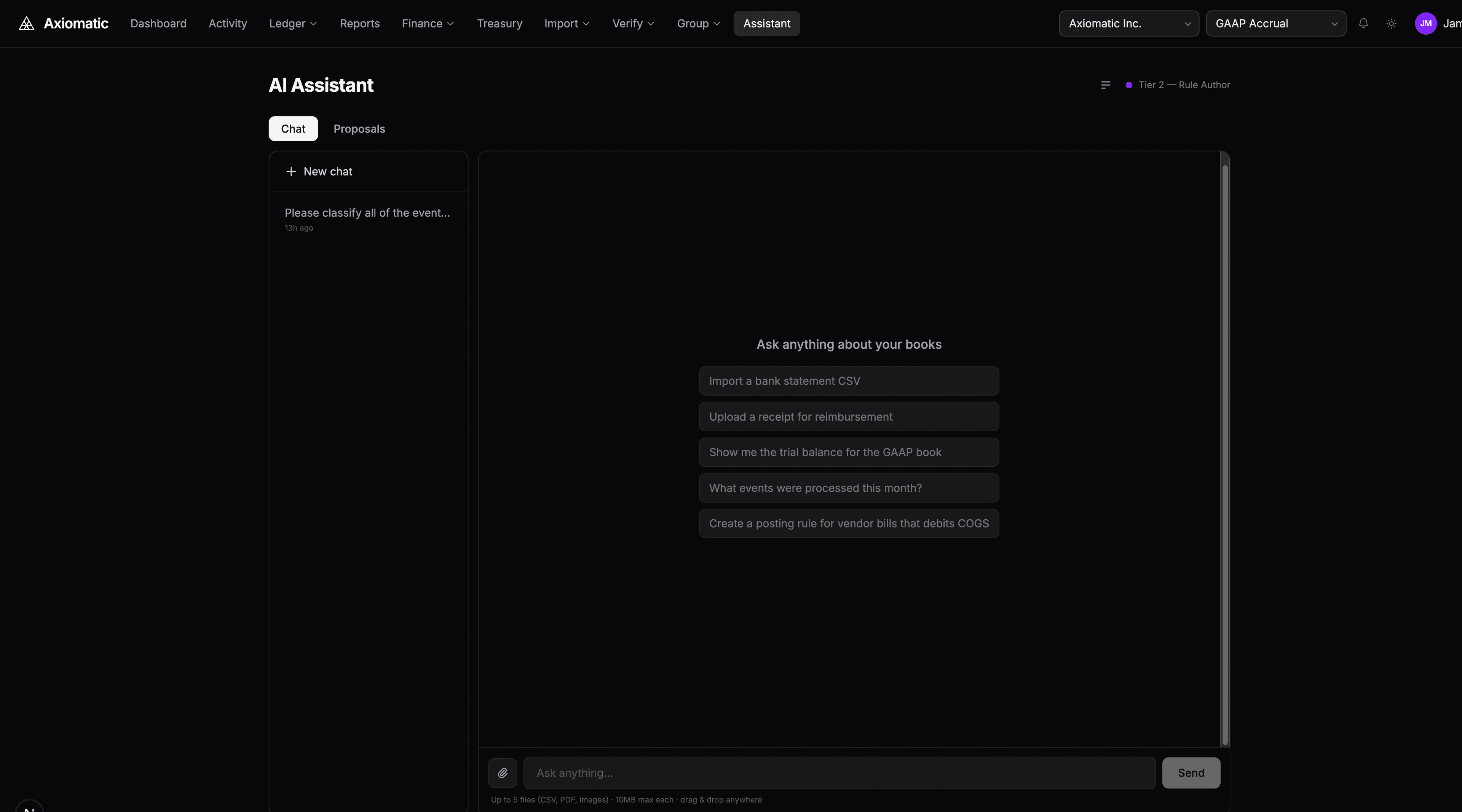
Querying Your Books
Ask questions about your financial data in plain English:
- "What's our cash balance?"
- "Show me all vendor payments over $5,000 this quarter"
- "Explain journal entry JE-042 — what rule produced it?"
- "What's our income statement for January?"
The AI has read-only access to all your entities, books, accounts, events, journal entries, and financial statements. It traces journal entry provenance back to the originating event and the DSL rule that produced it.
Classifying Imported Transactions
After importing bank transactions (via Plaid or CSV), ask the AI to classify them:
Classify all unmatched transactions
The AI:
- Fetches all unmatched imported transactions
- Analyzes each one to determine the correct event type
- Considers the transaction source (bank account type) when selecting rules
- Creates events and triggers the posting engine
- Returns a summary of what was posted
Source-Aware Classification
The AI respects source-aware guardrails. For example, a debit from a checking account is classified as vendor_payment (cash basis), not vendor_bill (accrual basis). This prevents common misclassification errors.
Human-in-the-Loop
For transactions above a configurable threshold, the AI presents a classification preview before committing. You can review, adjust, and approve before any journal entries are created.
For routine low-value transactions (below the autonomousPostingThreshold), the AI can post automatically without confirmation.
Reclassifying Transactions
If a transaction was classified incorrectly:
Reclassify event EVT-123 as income_received instead of vendor_payment
The AI:
- Reverses the original journal entries (creating reversal entries with flipped debits/credits)
- Creates a correction event linked to the original
- Processes the correction through the posting engine
- Preserves the full audit trail: original → reversal → correction → new entries
You can also batch reclassify:
Reclassify all vendor_bill events from bank imports to vendor_payment
Authoring Posting Rules
The AI can propose new DSL posting rules:
Create a rule for software subscription expenses
The AI generates a complete DSL rule with proper account mappings, conditions, and posting lines. Rules go through a proposal workflow:
- AI generates the rule and creates a PENDING proposal
- You review the proposed rule in the Proposals tab
- Approve to publish the rule, or reject with feedback
- If the AI needs more information, it asks clarifying questions before finalizing
Running Accounting Engines
The AI has access to dedicated accounting engines for standards-compliant operations:
Revenue Recognition (ASC 606)
Recognize revenue for contract CTR-001 through March 2026
Runs the five-step ASC 606 model, posting earned revenue based on performance obligation schedules.
Lease Accounting (ASC 842)
Activate the office lease
Creates the right-of-use asset and lease liability journal entries per ASC 842.
Process the March lease payment
Splits the payment into principal (liability reduction) and interest expense.
FX Revaluation
Run FX revaluation for the GAAP book as of March 31
Revalues all foreign-currency balances and posts unrealized gain/loss entries.
Accrual Processing
Process all accruals due through March 31
Posts entries for deferred revenue, prepaid expenses, accrued expenses, and accrued revenue schedules.
Period-End Adjustments
Run all period-end adjustments for Q1 2026
Runs depreciation, FX revaluation, accruals, and interest accrual in a single batch.
Importing Data
Drag a CSV, PDF, or image file into the chat window to import data:
- CSV — The AI reads headers, normalizes rows, and bulk imports with duplicate detection. Supports Mercury, Chase, Coinbase, and arbitrary CSV formats.
- PDF/Image — The AI extracts receipt or invoice data for expense reimbursement events.
Tips
- Use specific language: "List all events of type vendor_payment created this month" is better than "Show me payments"
- The AI remembers context within a conversation — you can refine queries across multiple messages
- Press Cmd+K to open the command palette for quick navigation between pages
- The AI can explain any journal entry's provenance: which event triggered it, which DSL rule matched, and what version of the rule pack was active
Next Steps
- Creating Custom DSL Rules — Write your own posting rules for custom event types
- Reconciling Bank Transactions — Use the AI to bulk-classify unmatched transactions